


Thank You!
Thank you for purchasing a Dab Rite Pro Digital IR Thermometer!
We know and understand the ritual of dabbing and set out to create a new product that not only fits aesthetically with your rigs, mats and other fine accessories, but actually provides accurate temperature readings in order to take the perfect dab.
Utilizing high grade industrial components and custom programming, the Dab Rite will alert you when the temperature you set to take your dab is reached so you no longer have to worry about reheating your banger or taking a dab that is too hot. Say goodbye to chazzed bangers and say hello to proper dabs.
Once you Dab Rite, you’ll never dab wrong again.
Table of Contents
Meet the Dab Rite Pro
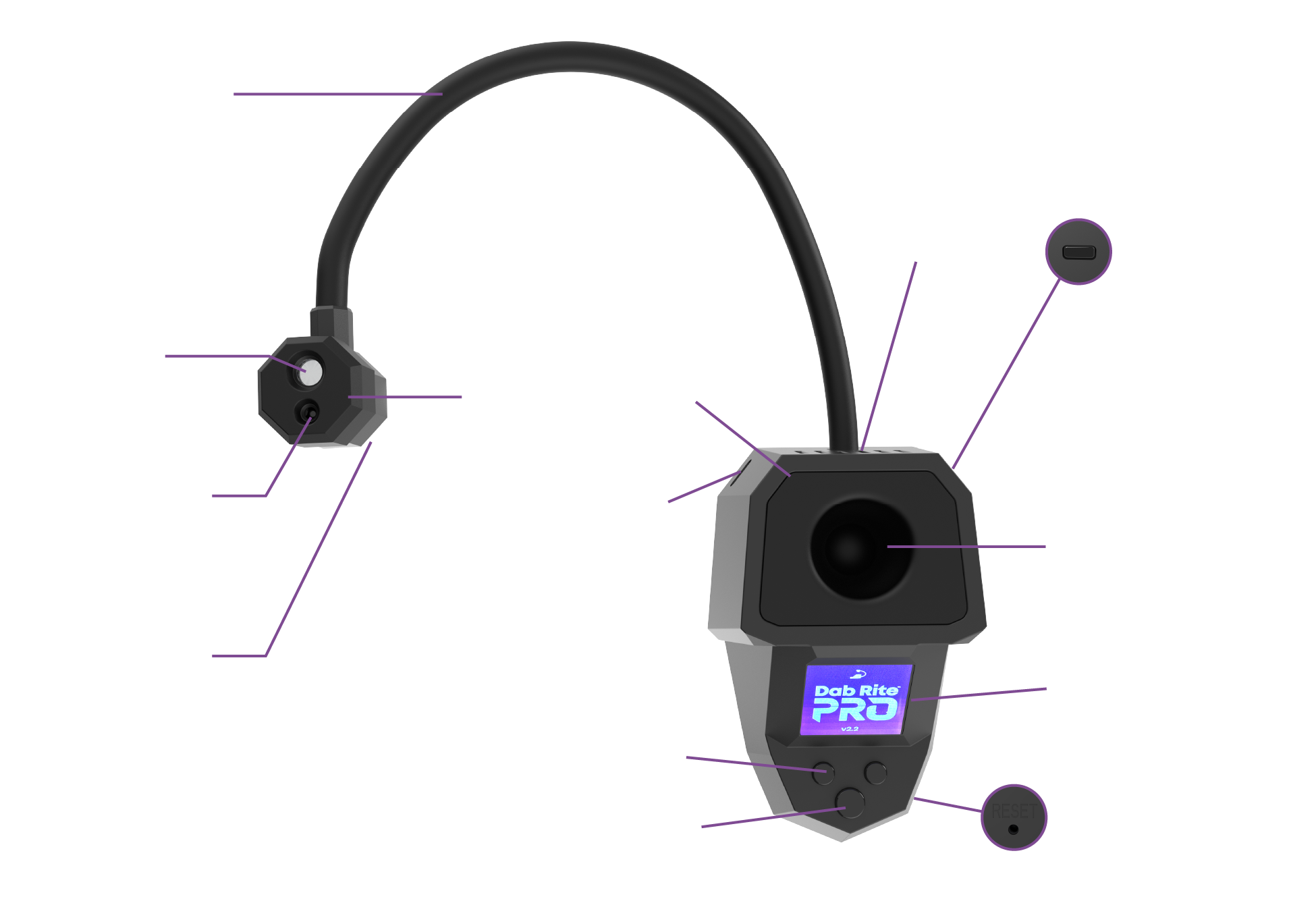
- Store between 50°F to 104°F
- Keep away from moisture
- Do not leave outside
- Do not drop
- Keep out of reach of children
Before You Start

Charge your Dab Rite Pro for 1-2 Hours prior to first use
Using The Dab Rite Pro
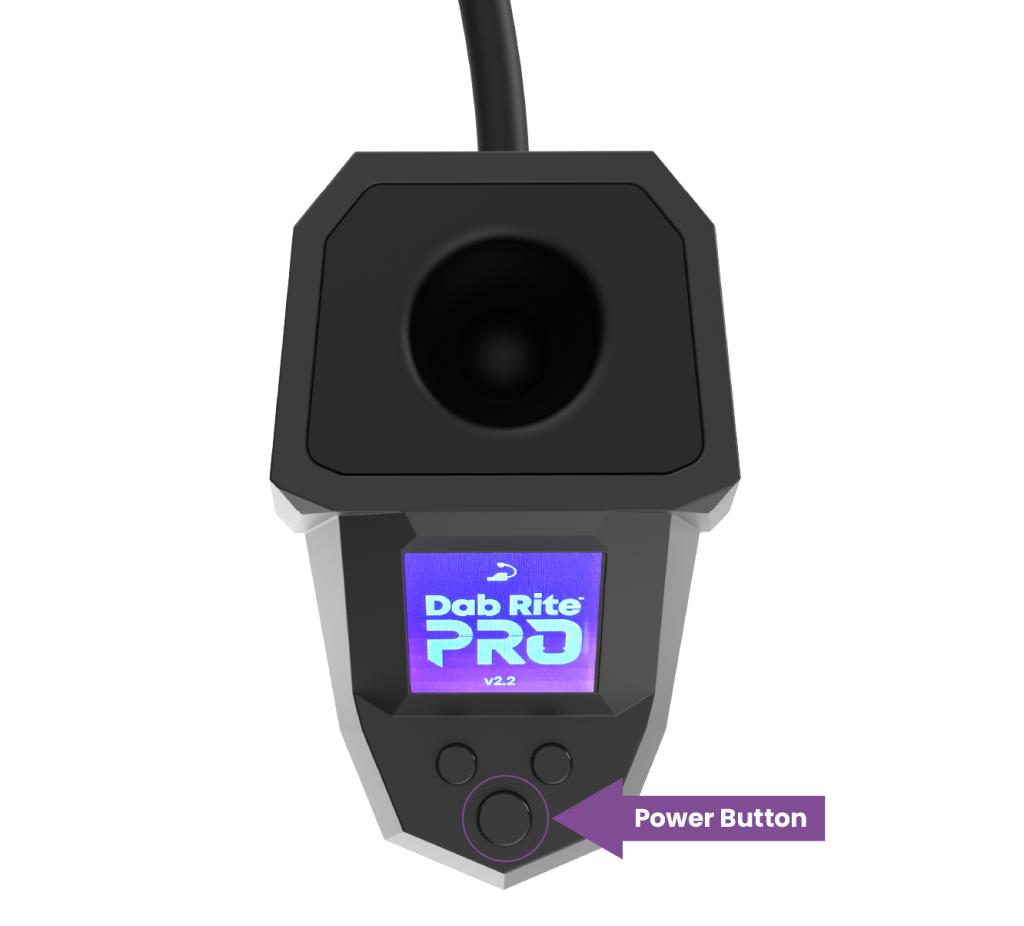
Powering On / Off & Auto Off
To power on the Dab Rite PRO, press the power button once until the screen illuminates.
To power the Dab Rite PRO off, press and hold the power button for three seconds.
The Dab Rite PRO will automatically turn off if it is left on and unused for five minutes.
There is a Reset button on the bottom of the unit.
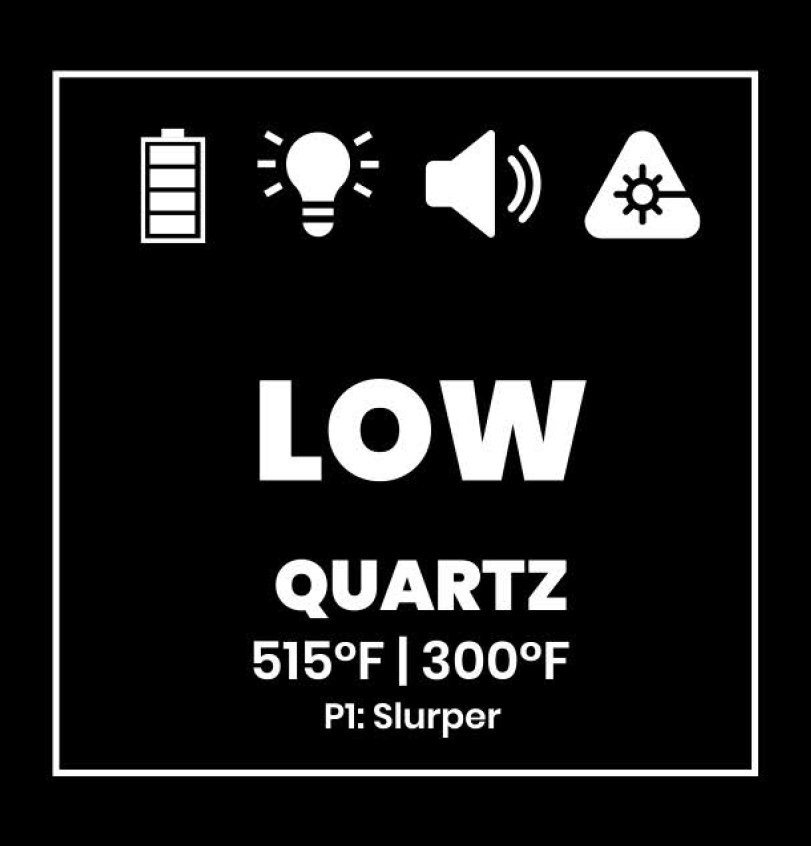
Display Screens & Icons

Dab Rite Pro Settings
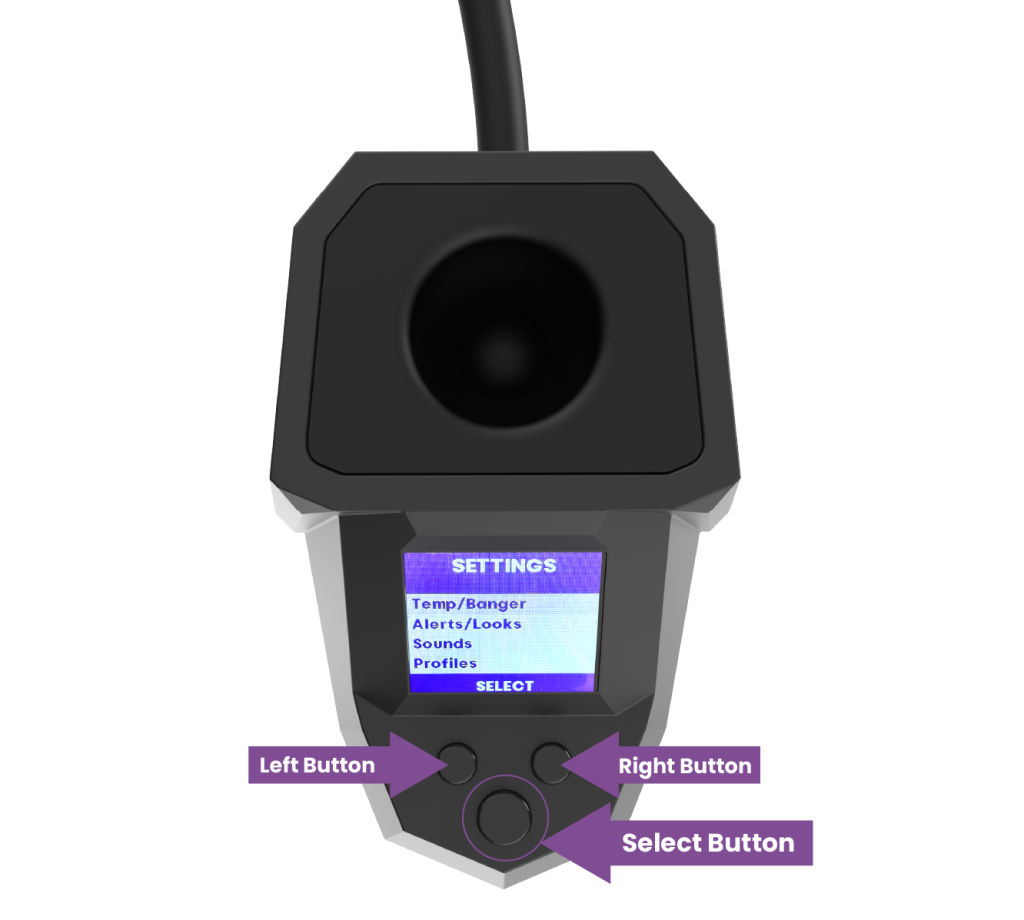
The Dab Rite PRO has a whole new slew of features and along with them comes a new menu system that will still feel familiar for any original Dab Rite users.
Press the SELECT button once from the home screen to access the menu. Once in the menu, use the left/right scroll buttons to choose which settings you would like to access.
Temp/Banger
Dab Temp: This is the alarm that alerts you when your desired Dab Temperature has been reached.
Dunk Temp: This is the alarm that alerts you when your banger has reached the desired temperature low enough to clean the banger with a cotton swab or dunk it in isopropyl alcohol for cleaning.
Temperature Scale: Allows you to choose between Fahrenheit and Celsius for temperature readings.
Banger Type: Changes the emissivity based on your type of banger; Quartz or Opaque Quartz.
Alerts/Looks
Sound Alerts: When ON, Speaker icon is shown and sounds will play for alerts. When OFF, Speaker icon is not shown and no sounds will play for alerts.
Light Alerts: When ON, Light Bulb icon is shown and LED Guide Light will flash for alerts. When OFF, Light Bulb icon is not shown and LED Guide Light will not flash for alerts.
LED Guide: When ON, LED Guide Light next to the sensor will illuminate for lining up with your banger. When OFF, LED Guide Light will not be on, but will still flash if Light Alerts are turned ON.
Night Mode: When ON, the screen background switches to purple which reduces the light emitted by the screen. When OFF, the default white background is displayed on the screen.
Sounds
Setting The Volume Level: Choose your desired volume level by using the left/right buttons.
Note: To completely mute the Dab Rite PRO, Button Sounds need to be set to NONE and Sound Alerts need to be OFF.
Choosing Button Sounds: Choose between six different button sounds by using left/right buttons to scroll through each sound for a preview. Scroll & Select keys have their own unique sounds. Press NEXT to select desired button sounds.
Choosing Dab Temp Alarm Sound: Choose between six different Dab Alarm sounds by using left/right buttons to scroll through each sound for a preview. Press NEXT to select your desired Dab Alarm.
Choosing Dunk Temp Alarm Sound: Choose between six different Dunk Alarm™ sounds by using left/right buttons to scroll through each sound for a preview. Press NEXT to select your desired Dunk Alarm™.
Profiles
The Dab Rite PRO can now save up to four profiles so switching between users, rigs, bangers or types of concentrates has never been easier. Profiles will save all your settings and you can choose from nine presets for naming each profile.
When in the Profiles setting, you can see your current profile (if one is set), Load a profile or Save a profile.
Load Profile: Scroll to desired Profile and press LOAD. You will be returned to the Home Screen and the Profile name will be displayed at the bottom of the screen.
Save Profile: Choose which Profile number (1–4) you would like to save and press SELECT, then scroll to desired Profile Name and press SAVE PROFILE. You will be returned to the Home Screen and the Profile name will be displayed at the bottom of the screen. You can Override a profile if it is already saved by choosing it again before you save.
Home Screen: Press this to exit the menu and return to the Home Screen.
Sensor Placement
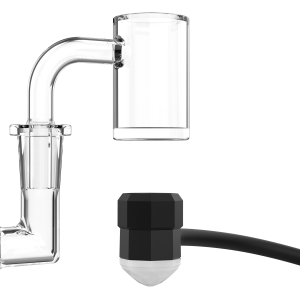
Bottom of Banger: If temping from the bottom of your banger, the sensor needs to be centered under the middle of the banger. The LED Guide light should illuminate the edge of the banger. The sensor should be about ½” or a finger-width away from the bottom of the banger. The max range for the sensor is 1.5″ from the bottom of the banger.

Side of Banger: If temping from the side or the column/barrel of your banger, the sensor needs to be centered on the column/barrel. If temping from the front of the rig, the LED Guide light should illuminate near the arm of the banger. The sensor should be about ½” or a finger-width away from the side/column. The max range for the sensor is 1.5″ from the side of the banger/column.
Distance to Spot Ratio: The Dab Rite PRO sensor has a 3:1 distance to spot ratio, meaning that in order to measure a 1″ diameter circle or spot you need to be 3″ away. The closer the sensor is to the banger, the smaller the area being measured but with higher precision. An evenly heated banger is recommended for the best results.
Arm Movement
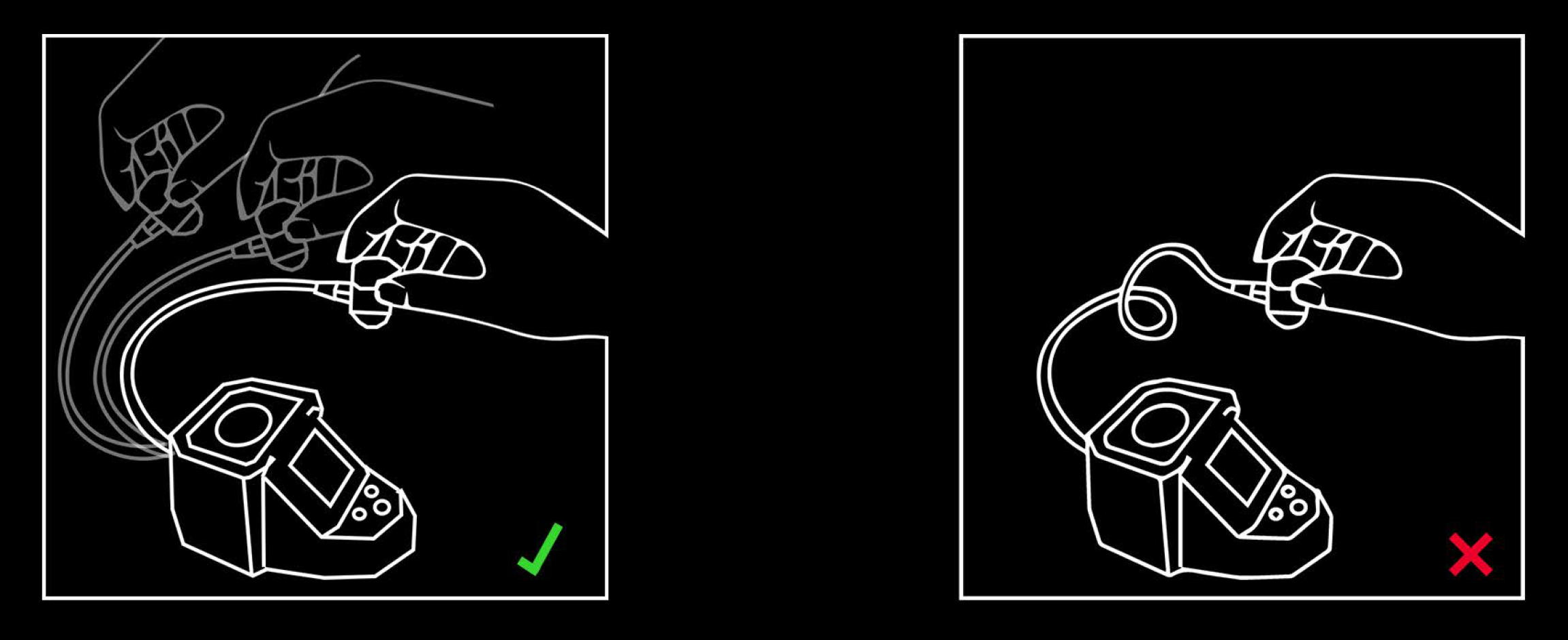
Do not over twist or pretzel the arm or spin the sensor head; you risk breaking the wires that connect from the sensor to the body. Use up, down, left and right motions to gently adjust the arm to your desired placement.
Suggested Temperatures

Vaporization temperatures can range based on several factors like concentrate type, banger type, use of terp pearls and more. The following are suggestions to be used as a starting point, but we encourage you to dial your unit in yourself based on your specific needs.
Torching
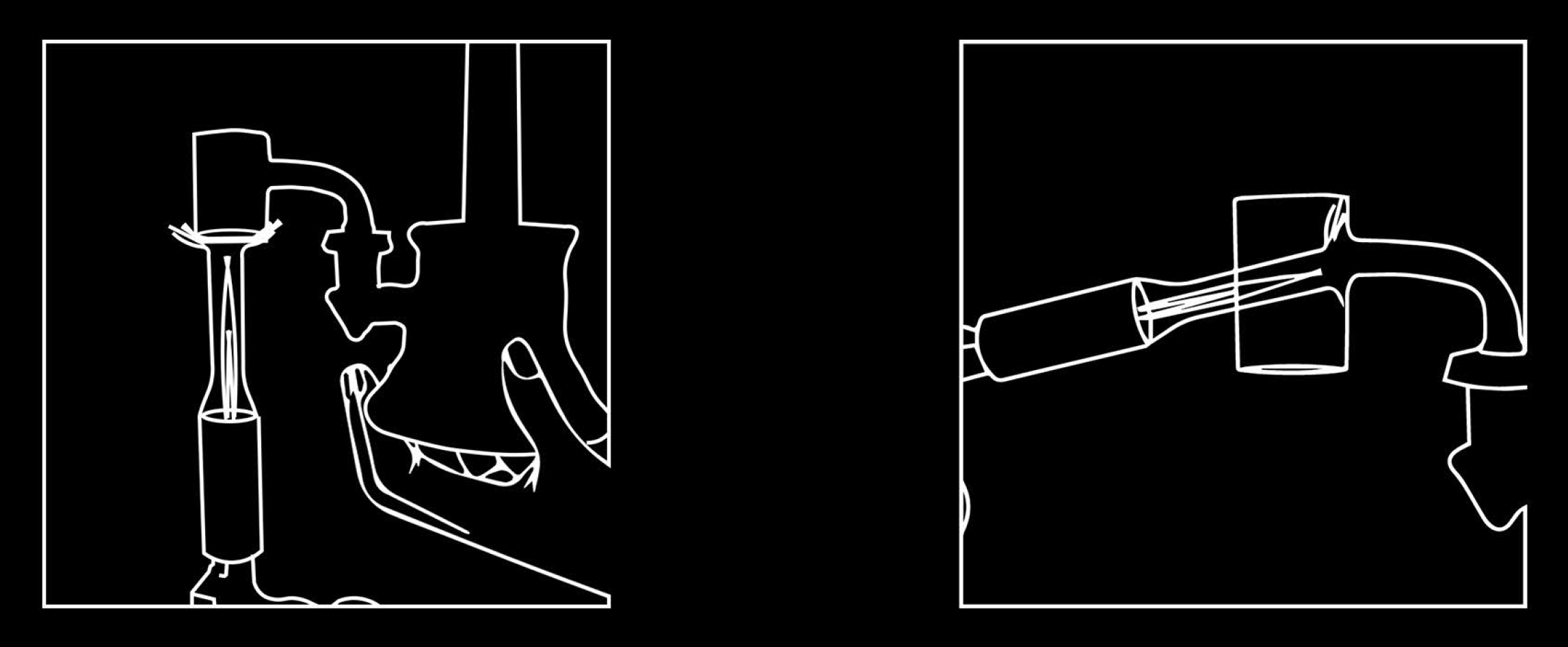
Bucket Banger: Torch the entire banger evenly for about 30 seconds and temp from the bottom or the side of the bucket.
Slurper Banger: If measuring the temperature from the side or the column/barrel we recommend torching the bottom dish of the slurper first for about 5–6 seconds, then torch the rest of the banger above the dish evenly for another 20–25 seconds. If temping from the bottom, heat the entire slurper evenly for about 30 seconds.
Temperature Sensing
- RED: TOO HOT — Temperature reading is 101°F and above the Set Dab Temp.
- YELLOW: Temperature is between 20–100°F above the Set Dab Temp.
- GREEN: DABBING RANGE — Temperature is +/– 20°F from the Set Dab Temp.
- BLUE: DUNKING/LOW — Temperature is 21°F and lower than Set Dab Temp. Dunk Alarm is shown in Blue font.
Dabbing

Bucket Banger: Once the alarm goes off or you’re ready to dab, place the dabber tool with your concentrate in the banger and let it melt off the dabber before placing your carb/spinner cap on top and inhaling.
Slurper Banger: Once the alarm goes off or you’re ready to dab, place the dabber tool with your concentrate near an intake vent in the corner where the dish and column meet and inhale while letting the concentrate melt into the column/barrel of the slurper.
Dunking/Cleaning the Banger

When your dab is finished, place the rig and banger back into position over or next to the sensor and allow the temperature to be read. Once the Dunk Alarm goes off, you can safely and carefully remove the banger from the rig by grabbing it near the joint. Place banger in 91%+ isopropyl alcohol and allow banger and terp pearls if using any to be rinsed. If necessary, use a cotton swab to remove any debris. Remove the banger from the alcohol after sufficient cleaning and dry it with your microfiber rag or towel of choice. Make sure to dry the inside properly so all the alcohol evaporates.
Sensor Cleaning
The Dab Rite PRO has an all new gasketed silica shield covering the sensor so there is less chance of debris obstructing the sensor’s IR field.
To clean the sensor shield, use a cotton swab very lightly dipped in 70%+ isopropyl alcohol and gently wipe the shield to remove debris. Do not use too much alcohol on the cotton swab.
If any debris remains, use a thin tool or toothpick to gently remove the debris. A clean shield will look shiny and mirror-like.
Do not scratch the sensor shield or use anything abrasive to clean it.
Body Cleaning
To clean the body of the Dab Rite PRO, use a small amount of 70% isopropyl alcohol on a microfiber cloth or soft towel. Do not use anything abrasive or you risk scratching the body.
If the body has any graphics, avoid rubbing them with alcohol.
Do not let any alcohol or liquid near the buttons, speaker or charging port.
Do not oversaturate cleaning towel with alcohol.
Silicone Cleaning
We recommend removing the silicone prior to cleaning to avoid any alcohol potentially getting inside the Dab Rite PRO body or sensor head.
Gently pull on the silicone to remove it from the body and sensor head. Using a microfiber cloth or soft towel lightly dipped in alcohol, gently rub the silicone with the alcohol and cloth until clean. Rinse in alcohol or dunk tank if desired. Dry with cloth and re-insert onto Dab Rite PRO body and sensor head.
We recommend replacing silicone components every few months.
Charging / Battery Life / Charging Screen

The Dab Rite PRO utilizes USB-C for charging. Any USB-C cable and charging brick will work to charge the unit. Charge for 1–2 hours before first use.
Battery life is displayed by 4 bars, each representing 25% battery life. When the battery is less than 10% the bottom bar will flash RED.
When the battery is depleted and the Dab Rite PRO needs charging, a charging screen will appear to let you know it’s time to charge.
When plugged in and powered OFF, the charging screen will appear showing you the charge progress and the screen will read FULLY CHARGED when charging is complete.
The Dab Rite PRO has pass-through charging and can be used while plugged into a power source for charging.
Dab Rite PRO batteries have a 6 month limited warranty against manufacturer defects. More information can be found in the Limited Warranty.
Sesh Light™
One of the new features of the Dab Rite PRO is the all new Sesh Light™. Dabbing in the dark or low light has never been easier.
On the back right side of the Dab Rite PRO when it’s facing you is the button for the Sesh Light™. One click is half brightness, the next click is full brightness and the next click is OFF.
The sesh light cover can be removed and replaced with the low profile version for smaller rigs or for personal preference.
Shortcuts
Home Screen: Return to the Home Screen from the menu by holding down the SELECT button for three seconds.
Profile Quick Switch: From the Home Screen, press and hold the RIGHT button for three seconds until the profile name blinks. Use LEFT/RIGHT scroll buttons to cycle through the profiles and press the SELECT button to load that profile.
LED Guide Light: To turn the LED Guide Light ON/OFF without using the menu, triple click the RIGHT button from the Home Screen.
Powering Off: The Dab Rite PRO shuts off automatically, but can be powered down manually by pressing and holding the SELECT button for three seconds.
Mute Power On/Off Sounds: To mute/unmute the powering off sounds, hold the sesh light button down for 3 seconds when the Dab Rite PRO is powered on and you will hear a click.
Limited Warranty
Dab Rite warrants to the original end-user (“Purchaser”) of the Dab Rite PRO product (“Product”) that the Product shall be free of defects in design, assembly, material, or workmanship for one (1) year from the date of purchase (battery has a limited warranty of 6 months). The full limited warranty can be found in your Compliance Guide that came with your Dab Rite PRO or on DabRite.com/warranty.
Tech Specs

PLEASE NOTE
This device is not intended for human or animal use and should not be used to take temperatures of anything other than quartz. Dispose of unit properly as it contains a Lithium Ion battery.
This device complies with part 15 of the FCC Rules. Operation is subject to the following two conditions: (1) This device may not cause harmful interference, and (2) this device must accept any interference received, including interference that may cause undesired operation. This device complies with part 18 of the FCC Rules.
Stay in Touch/Support
Feedback Hearing from customers is how we’ve been able to continue making products that revolutionize how we take dabs. If you have feedback you’d like to share, we are listening. Please email hello@dabrite.com and share your experience with us.
Customer Service Need help? We have a dedicated team ready to assist you, you just need to reach out and ask for help! Email help@dabrite.com or fill out the contact form on DabRite.com/contact and our Customer Support will do their very best to assist you and make sure you have a great service experience.
Instagram We love to show off and know you do too. Share your Dab Rite PRO and your dabbing ritual with us on Instagram @TheDabRite for chances to be featured on our story and follow us for news, giveaways, collaborations, new products and more!